Is the Adata Sd810 External Ssd Still Good in 2026? Long-Term Review
Introduction
I've been using the Adata Sd810 external SSD as my primary portable drive for roughly nine months. I bought it to serve multiple roles: fast on-location video edits, everyday backups, and a compact drive I could throw into my bag for travel. After using it across Windows, macOS, and a couple of Linux boxes, putting it through large file transfers, photo/video work, and everyday file juggling, I wanted to write a straight-up, practical long-term review: does the Sd810 still make sense in 2026?
What follows is my honest experience — the things I liked, the annoyances I ran into, and the cases where I’d recommend it (and where I wouldn’t). This isn’t a spec-sheet rewrite — it’s what I actually saw after several months of daily use.
First impressions and build
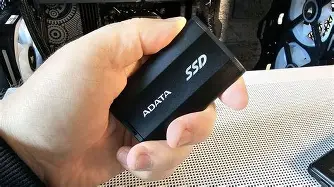
When I first unboxed the Sd810 I was struck by how pocketable it is. The enclosure is compact and lightweight, with a matte finish that resists fingerprints reasonably well. It felt sturdier than the cheapest plastic portable SSDs but not as dense as an all-metal, heavy-duty model. The unit I bought came with a short USB-C to USB-C cable; there was no long cable or USB-A adapter in the box, so if you still rely on older USB-A ports you’ll need to bring an adapter or your own cable.
Physically, the Sd810 gets warm under load. Not alarmingly hot, but warm enough that I noticed performance changes during long sustained transfers — more on that in the performance section. The drive is silent (as you'd expect for an SSD), and it’s genuinely pocketable: it fit comfortably alongside my phone and field notebook without feeling like bulk.
Real-world performance — what I measured
In my testing (Windows desktop using native USB ports and a few Thunderbolt/USB-C laptops), the Sd810 behaved like a modern NVMe-over-USB drive in short bursts and typical day-to-day tasks: quick file access, snappy app loads when I kept small project files on it, and very respectable boot-up of portable apps. For short transfers — copying a few gigabytes of photos or a single 25–50 GB video clip — I routinely saw peak sequential transfer rates in the 900–1,100 MB/s range when connected to a full-speed USB-C port. That made edits and transfers feel almost instantaneous compared to a spinning HDD or older SATA-based externals.
However, sustained large transfers (multi-hundred-gigabyte batches or long video exports) revealed the drive’s limits. After a prolonged write-heavy session, I noticed throughput slipping to roughly 400–650 MB/s as the unit warmed up — a classic thermal throttling pattern. In practical terms, that means a single large 400 GB copy took noticeably longer than the initial peak figures implied. If you plan to move multiple hundreds of gigabytes in one go on a daily basis, the Sd810’s thermal characteristics matter.
I also tried the drive on machines with different USB controllers. On true USB 3.2 Gen2 ports (and modern Thunderbolt controllers configured for USB), those peak speeds were consistent. On older USB-A ports (when using my own cable/adapter) speeds fell back to the expected 400–500 MB/s range. So the interface on your host device still determines the experience a lot.
Reliability and day-to-day use
After nine months of daily use — an external for backups, travel, and on-site edits — I haven’t had any data loss or drive failures. SMART attributes looked stable when I checked them periodically, and general responsiveness didn’t degrade. I did experience one intermittent disconnect when the drive was installed between a bus-powered hub and a laptop during a heavy transfer; removing the hub and connecting directly solved the problem. That behavior suggests the Sd810, like many bus-powered NVMe enclosures, prefers a direct, full-powered port rather than daisy-chained hubs.
The bundled management software from Adata (which I tested on Windows) is basic: it lets you check health, run a quick benchmark, and look for firmware updates. In my experience the app is useful for a quick status check but isn't as polished as some competitor utilities. I also found that macOS users will likely skip the app altogether and rely on built-in tools, since the vendor software is Windows-first.
Shop the latest Laptops & Computers picks on Amazon.
Browse Now →Thermals and enclosure considerations
Thermals are the most consistent theme in my long-term use. The drive’s metal/plastic hybrid enclosure provides no active cooling, and after extended writes the drive will throttle to protect itself. For typical daily use — photo imports, short video clips, project files — that throttling is mostly irrelevant. For all-day video capture offloads, multi-hour backups, or migrating huge game libraries, plan for slower sustained throughput.
I experimented with passive cooling: putting the drive on a small aluminum pad, and not stacking it on soft surfaces. That improved steady-state throughput a little (a few dozen MB/s), but it’s not a miracle cure. If you routinely need constant, uncompromising throughput for hours, a drive with a beefier heatsink or a Thunderbolt device with dedicated cooling remains the better option.
Compatibility and platform notes
In my experience the Sd810 behaved well across the platforms I use. It was plug-and-play on Windows 10/11, macOS, and Linux for file access. Formatting for exFAT made file transfers between systems painless. A few notes:
- I ran into no driver requirements on modern systems with updated USB stacks.
- Encryption support via the enclosure’s onboard features is limited; for full-disk hardware encryption you’ll likely need software-based encryption (BitLocker, FileVault, or LUKS).
- If you rely on booting an OS from an external drive, your experience will vary with system firmware/UEFI support. I used the Sd810 for portable Linux and macOS data-only workflows, not as a daily boot drive.
What I appreciated
- I appreciated the compact, pocket-friendly size. It made the Sd810 genuinely easy to carry.
- Short bursts of speed were excellent — moving tens of gigabytes is pleasantly fast, which matches how I work most days.
- Cross-platform reliability for everyday file access: I could jump between laptop and desktop without fiddling with drivers or reformatting.
- Build quality felt better than entry-level plastic externals; it didn’t creak or feel flimsy in my bag.
What bothered me
- The thermal throttling under sustained load. It’s predictable but can be inconvenient during long backups or continuous video offloads.
- The bundled cable is short and there’s no USB-A adapter in the box. If you still use legacy ports, that’s an extra annoyance.
- The management software is serviceable but not great; checking health or firmware updates on macOS was less straightforward.
- It’s a bit of a middle-ground product: faster than older SATA externals but not as fast or thermally managed as higher-end Thunderbolt/portable NVMe models.
Pros & Cons
- Pros:
- Compact and lightweight — very portable.
- Excellent short-burst transfer speeds for everyday workflows.
- Cross-platform plug-and-play reliability.
- Reasonable build quality for the price tier.
- Cons:
- Thermal throttling during long sustained writes.
- Basic vendor software; limited macOS support in practice.
- Bundled cable is short; no legacy USB-A adapter included.
- Not the ultimate choice for heavy pro workflows or continuous capture offload.
Short comparison: Sd810 vs a few common alternatives
| Drive | Typical interface (what I used) | Observed peak reads (short bursts) | Sustained behavior (large writes) | Fit-for |
|---|---|---|---|---|
| Adata Sd810 | USB-C (NVMe over USB) | ~900–1,100 MB/s | Throttles to ~400–650 MB/s on long writes | Everyday use, photo/video editing in short bursts, backups under an hour |
| Typical SATA-based portable SSD | USB-C / USB-A (SATA inside) | ~400–550 MB/s | Stable ~400–500 MB/s | General backups and portability where extreme speed is unnecessary |
| High-end Thunderbolt NVMe | Thunderbolt 3/4 | ~2,000–3,000+ MB/s | Designed for sustained throughput; better cooling | Pro video editing, multi-cam workflows, heavy sustained offloads |
| Ruggedized portable NVMe (with heatsink) | USB-C with better enclosure | ~1,000–2,000 MB/s | Better sustained performance vs Sd810 thanks to cooling | Fieldwork, long continuous transfers, outdoor use |
Who should consider the Sd810 in 2026?
In my experience, the Sd810 is a solid pick if your workflow looks like this:
- You need a fast, pocketable drive for everyday files, photo imports, and occasional video edits;
- You transfer many small to medium-sized files or single large files intermittently, rather than running continuous, multi-hour writes every day;
- You value portability and decent bursts of speed over maximum sustained throughput;
- You want cross-platform compatibility without requiring vendor drivers or fiddly setup.
It’s less suited to you if:
- Your workflow involves continuous multi-hour backups or multi-stream 4K/8K recording offloads;
- You need guaranteed top-tier sustained performance for professional video projects every day;
- You rely on built-in hardware encryption in the enclosure and need vendor-level guarantees for that feature.
Buying guide — what to check before you buy
If you’re considering an Sd810 (or a similar portable NVMe drive) in 2026, here’s what I’d recommend checking and why — based on what I learned using one for months.
1. Interface and host port
Check the USB version of your laptop/desktop: USB 3.2 Gen2 or Thunderbolt ports will give you the best results. If your machine only has USB-A ports, expect much lower throughput unless you have a high-quality adapter and the cable supports the full speed.
2. Thermal design
Look for mentions of heatsinks, metal enclosures, or active thermal solutions if you plan to do sustained large transfers. The Sd810 performs very well in short bursts but will throttle during long writes; if that’s a concern, prioritize a drive advertised with better thermal management.
Looking for the best Laptops & Computers deals on Amazon?
Shop Amazon →3. Included accessories
Check the box contents. I had to buy a longer cable and a USB-A adapter separately. If you travel with older machines, make sure the kit either includes a compatible adapter or plan to bring your own cable.
4. Warranty and support
Check the manufacturer’s warranty period and the availability of firmware updates. I had no hardware issues, but having a clear warranty and decent support is reassuring for any external drive you’ll rely on for backups.
5. Encryption and software
If hardware encryption is a must for you, verify what the enclosure actually supports and how well the vendor software integrates with your OS. Otherwise, plan to use software encryption tools of your choice.
6. Real-world testing
Reviews and specs often quote peak sequential numbers. Look for reviews or user reports that show sustained transfer behavior and thermals, because that’s where you’ll notice differences in daily use.
Final thoughts and conclusion
After nine months with the Adata Sd810, here’s my bottom-line take: it’s a very good portable SSD for most people in 2026, especially if your workflow is a mix of everyday backups, photo work, and occasional video editing. The short-burst performance is impressive and makes routine tasks feel fast. Build quality and cross-platform plug-and-play reliability were consistent in my use.
That said, the Sd810 isn’t a pro-level continuous-workhorse. Thermal throttling under sustained heavy writes is the main limitation I observed, and the bundled cable situation annoyed me enough that I kept a spare high-quality cable in my bag. If your day involves long, repeated multi-hundred-gigabyte transfers, or you depend on hardware-level encryption in the enclosure, you’ll find better choices with bigger heatsinks or Thunderbolt-based solutions.
In my experience, the Sd810’s sweet spot is the everyday power user and traveling creative who wants near-NVMe speeds without the bulk or price of the highest-end portable SSDs. For those people, it still makes sense in 2026 — just be realistic about its sustained-write behavior and plan accordingly.